


If you want to improve your website’s SEO performance and grow your traffic, one of the most important skills you need is understanding how to see what keywords a site ranks for. When you know which keywords bring traffic to your own site or a competitor’s site, you can make smarter decisions, publish better content, and increase your chances of ranking higher on Google.
This guide is designed especially for beginners and website owners who want a clear and simple explanation. You do not need advanced technical knowledge, expensive tools, or professional SEO experience to follow this guide. You just need to understand what to look for and how to use the data the right way.
In this complete guide, you will learn:
- How to see what keywords a site ranks for using free and paid tools
- How to understand keyword performance and what each metric means
- How to check keywords for your own website and competitor websites
- Why keyword analysis is important for SEO success
- How to find new keyword opportunities and content gaps
- A real example case study to show you the process and results
- Common mistakes to avoid
- A practical step-by-step action plan
Let’s begin.
Why You Should See What Keywords a Site Ranks For???
Checking keyword rankings is important because it helps you understand:
✔ Where your traffic is coming from
You see what people are searching before they land on your website.
✔ Which pages are performing well and which need improvement
You can update and optimize pages that are close to page one rankings.
✔ What keywords your competitors are ranking for
This helps you create better content and outrank them.
✔ New content ideas based on real demand
Instead of guessing, you plan your content strategy using real data.
✔ Long-term website growth
You can monitor improvement over time and measure what is working.
In simple words:
When you know the keywords a site ranks for, you can grow faster and smarter.
What Keyword Ranking Means
When someone searches something on Google, a list of results appears. If your website appears in that list, then your site ranks for that keyword.
Higher ranking positions lead to more clicks.
| Google Position | Approx Clicks |
|---|---|
| Position #1 | 30%–40% clicks |
| Position #2-3 | 15%–20% clicks |
| Position #4-10 | 5%–10% clicks |
| Page 2 or more | Less than 1% |
That is why SEO experts work hard to reach page one.
Important Metrics When Checking Keyword Rankings
When you see what keywords a site ranks for, you will also see data like:
| Metric | Meaning |
|---|---|
| Impressions | How many times your page appeared in search results |
| Clicks | How many times users clicked your page |
| Average Position | Your ranking position |
| CTR | Click-through rate (clicks ÷ impressions) |
| Search Volume | How many people search that keyword monthly |
| Keyword Difficulty | How hard it is to rank for that keyword |
These metrics help decide:
- Which keywords to optimize
- Which keywords to create content for
- Where opportunities exist
How to See What Keywords a Site Ranks For — Free Method (For Your Own Website)
The best free tool is Google Search Console (GSC).
It shows real data directly from Google search.
How to use Google Search Console
- Open Google Search Console
- Select your website property
- Click Performance
- Open Search Results
- Scroll to Queries
- Turn on Average Position, Clicks, Impressions, CTR
Now you can clearly see what keywords your site ranks for, with real numbers showing how users find you.
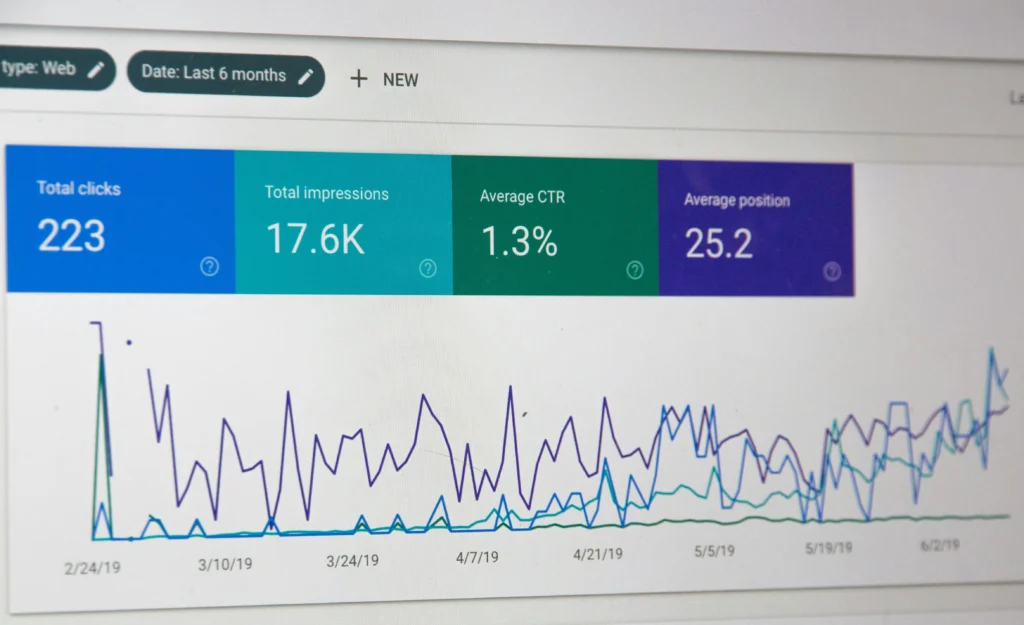
Why GSC is valuable
- 100% free
- Shows real performance data
- Helps discover long-tail keywords available but unused
- Helps identify pages close to page one
- Helps choose which keywords to improve first
Limitations
- Works only for your own website
- No competitor keyword list
- Does not show keyword difficulty automatically
To see competitor keywords, use tools below.
How to See What Keywords a Site Ranks For — Competitor or Other Website
To check any website you don’t own, use SEO tools.
These tools show estimated rankings, search volume, and keyword performance.
Popular tools to see keywords for any site
| Tool | Best for |
|---|---|
| Ahrefs | Deep competitor keyword research analysis |
| SEMrush | Detailed keyword tracking & audit |
| Ubersuggest | Beginner friendly and cheap |
| Sitechecker / SERP Robot | Quick rank checker |
| Moz | Basic competitive keyword insight |
How to see what keywords a site ranks for using Ahrefs
- Open Ahrefs Site Explorer
- Enter any website URL, e.g. competitor.com
- Open Organic Keywords report
- View keyword rankings, search volume, difficulty, position, URL
- Export the list for planning
What you learn
- Which keywords bring traffic to a competitor
- Which topics you should write about
- Keyword gaps (keywords they rank for, but you don’t)
- Pages generating the highest traffic
This information is extremely useful for planning new content with higher ranking potential.
Smart Keyword Strategy Tips for Better Results

Now that you know how to see what keywords a site ranks for, here are strategies to grow faster.
🌱 Target Long-Tail Keywords
Example:
- how to start blogging for beginners
- best SEO tools for new bloggers
- Why SEO is Important for Your Website in 2025
Long-tail keywords:
✔ Easier to rank
✔ Less competition
✔ Higher conversion intent
🧩 Match Search Intent
Understand what the user wants:
- Learn something?
- Compare options?
- Buy something?
Google rewards content that satisfies user needs.
🔗 Build Internal Linking
Link related blog posts together to increase authority and ranking power.
🌍 Optimize for SERP Features
Add:
- FAQs
- bullet points
- short sentences
- tables
- examples
- images
This increases chances of getting featured snippets.
Read Also This – AI Visibility in 2025: How Brands Can Dominate Search Before Competitors Do
📦 Real Case Study Example
Website example: growthskillsblog.com (sample case)
Starting condition
- 16 articles
- No keyword tracking
- Very low organic traffic
Data from Google Search Console
| Keyword | Position | Impressions | Clicks |
|---|---|---|---|
| digital marketing basics | 17 | 3,900 | 70 |
| learn SEO step by step | 22 | 2,400 | 45 |
| what is backlink building | 33 | 1,700 | 20 |
Competitor analysis (using Ahrefs)
Competitor ranking higher had:
- Longer articles
- Internal links
- FAQ section
- Updated content
- Better titles
Optimization actions taken
✓ Expanded content from 900 to 1800 words
✓ Added FAQs
✓ Improved meta title & description
✓ Added internal links
✓ Added long-tail keyword variations
✓ Updated to 2025 version
Result after 10 weeks
| Keyword | Old → New Position | Traffic Increase |
|---|---|---|
| digital marketing basics | 17 → 7 | +280 visits/month |
| learn SEO step by step | 22 → 10 | +190 visits/month |
Total traffic growth = +58%
This shows how checking keyword rankings leads to real improvements.

🚫 Common Mistakes When Checking Keyword Rankings
- Only checking rankings manually on Google
- Focusing only on search volume instead of user intent
- Ignoring CTR and impressions
- Never updating old posts
- Copy-pasting competitor content instead of improving value
- Expecting results instantly (SEO takes time)
📝 Step-by-Step Action Plan
| Step | Action / Status |
|---|---|
| Check keywords using Google Search Console | ✓ Done on 28 Nov |
| Identify keywords ranking positions 6–20 | In progress |
| Improve content and meta descriptions | Pending |
| Add FAQs, images, internal links | Pending |
| Check competitor keyword gaps | plan next week |
| Write new content for missing keywords | scheduled |
| Track ranking every month | set reminder |
| Repeat consistently | — |
🎯 Conclusion
Now you clearly understand how to see what keywords a site ranks for, how to use Google Search Console to check your own keyword rankings, and how to use tools like Ahrefs and SEMrush to analyze competitor keywords. You also learned how to find opportunities, improve underperforming pages, and build better content strategies. If you follow this guide and track your keyword rankings regularly, you will see steady growth in visibility, traffic, and ranking performance over time.
Frequently Asked Questions (FAQs)
How can I see what keywords a site ranks for?
You can see what keywords a site ranks for by using tools like Google Search Console (for your own site) and tools like Ahrefs, SEMrush, or Ubersuggest (for competitor sites). These tools show keyword positions, search volume, traffic, and ranking pages.
How can I see what keywords my website ranks for for free?
The best free method is Google Search Console. You can view keywords under Performance → Search Results → Queries, where Google shows impressions, clicks, average position, and CTR.
How do I see what keywords a competitor’s website ranks for?
Use competitor keyword research tools like Ahrefs Site Explorer, SEMrush Domain Overview, or Ubersuggest. Enter the competitor’s domain and open the Organic Keywords report to see estimated rankings and traffic.
Do I need paid tools to check keyword rankings?
No, paid tools are optional. Google Search Console is free for your own website, and Ubersuggest has a free version. Paid tools simply offer more detailed keyword data and competitor insights.
How often should I check my website keyword ranking?
Checking keyword rankings once a month is enough for most websites. If you publish content frequently, you can check weekly. Daily checking is unnecessary because rankings change slowly.
What is the best tool to see what keywords a site ranks for?
For your own site, Google Search Console is the best.
For competitor sites, Ahrefs and SEMrush are the most accurate for keyword tracking and traffic estimation.
Why do my keyword rankings keep changing?
Google ranking changes because of algorithm updates, competition, SEO changes, backlinks, and content freshness. Small ups and downs are normal — consistent improvement is more important than daily position.
Can I see what keywords a site ranks for without access to their website?
Yes. Tools like Ahrefs, SEMrush, Moz, and Ubersuggest analyze public data and show estimated rankings for any website without needing admin access.
How can I use keyword ranking data to improve my SEO?
Look for keywords ranking between positions 6–20 and optimize those pages with better content, internal links, FAQs, examples, and improved meta descriptions. These keywords are easiest to move to page one.
Can long-tail keywords help my website rank faster?
Yes, long-tail keywords are easier to rank for and bring more targeted traffic. They also help build topical authority and improve rankings for main keywords over time.




Pingback: How Do I Get My Website Indexed by Google? Complete Guide
Pingback: How Long Does SEO Take to Show Results in 2026?
Pingback: How to Rank on ChatGPT & Perplexity in 2026 | Advanced GEO Strategy Guide
Pingback: 07 Proven Ways to Boost Local Voice Search Rankings (2026)
Pingback: How to Do an SEO Competitor Analysis Without Paid Tools